3D Construction Pack: A Versatile Tool for Designers and Creators
Whether you're crafting digital content for a website, designing promotional materials, or building UI/UX elements, visual assets are the backbone of your work. The 3D Construction Pack is a powerful resource that provides a wide array of ready-to-use 3D models in various formats—JPG, PNG, and BLENDER files. This pack is more than just a collection of images; it's a toolkit designed to enhance creativity, speed up workflows, and add depth to your designs across multiple platforms and industries.
What Is the 3D Construction Pack?
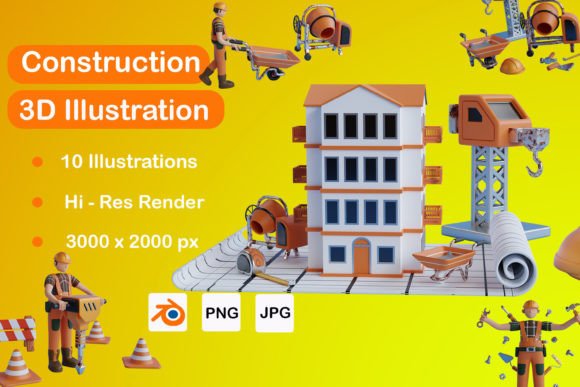
The 3D Construction Pack is a comprehensive set of construction-themed 3D assets that can be used in both 2D and 3D design environments. It includes 10 high-quality JPG files, 10 transparent PNGs, and 10 editable BLENDER files, giving users flexibility depending on their project needs. These files feature realistic textures, detailed structures, and scalable elements suitable for both print and digital media.
Real-World Uses for the 3D Construction Pack
Designers, marketers, educators, and hobbyists often find themselves needing visuals that stand out without spending hours creating them from scratch. That’s where the 3D Construction Pack shines. Here are some practical use cases:
1. Website and Web App Design
If you're working on a site related to architecture, real estate, or engineering, adding 3D construction visuals can make your interface more engaging. For example, using the BLENDER files allows you to customize models to match your brand colors or layout. You could create an interactive section on your site that lets users explore a building process step-by-step with these models.
2. Social Media and Marketing Campaigns
Marketers looking to promote construction services, building products, or home improvement solutions can leverage the 3D Construction Pack to craft eye-catching banners and posts. The transparent PNGs are especially useful for overlaying on different backgrounds. Imagine promoting a new line of smart home tools by placing a stylized 3D model of a wrench or blueprint in the foreground of a vibrant cityscape image—it adds clarity and professionalism instantly.
3. Educational Materials and Presentations
Teachers and educators who explain construction techniques, architectural principles, or urban development can benefit from this pack. The detailed 3D models help break down complex concepts into digestible visuals. For instance, when teaching about structural supports, you can show a clear PNG of a steel beam and annotate it directly in your slides.
4. Print Media and Poster Design
Small business owners or freelancers in the construction industry might need posters for open houses, equipment rentals, or safety training sessions. With the 3D Construction Pack, they can quickly generate professional-looking graphics. A local contractor, for example, could use a 3D blueprint graphic as part of a poster announcing a residential renovation service.
5. Game Development and Interactive Content
If you're into indie game creation or developing educational simulations, the BLENDER files offer a great starting point. You can import them into your engine and tweak lighting, scale, or animation to fit your narrative. A student making a virtual reality tour of a building site can easily animate cranes or scaffolding using these pre-built models.
Why Choose the 3D Construction Pack?
One of the biggest advantages of the 3D Construction Pack is its adaptability. Unlike generic stock images, the models included here are tailored for construction-related themes but remain flexible enough to suit a variety of contexts. They’re also optimized for quick rendering, which means less waiting time and faster iterations during the design process.
For entrepreneurs launching a new construction app or platform, having access to accurate and visually appealing 3D models is essential. These files allow you to prototype features like virtual tours, cost estimators, or material selections without investing in custom modeling. You can build a mockup using the PNGs and later transition to full 3D interactivity using the BLENDER versions.
Who Can Benefit Most?
While the 3D Construction Pack is a general-use tool, certain professionals and creators will find it particularly valuable:
- Graphic designers who need construction-themed visuals for clients in real estate or infrastructure sectors.
- UI/UX developers looking to add immersive elements to their apps or websites without deep 3D modeling skills.
- Freelancers who want to expand their portfolio with modern, tech-forward projects involving 3D elements.
- Small businesses aiming to improve their branding through consistent, high-quality imagery.
- Educators who want to bring technical subjects to life with dynamic, visual aids.
Take a blogger writing about DIY home improvements. By incorporating a 3D blueprint or a close-up of a hammer from the pack into their articles, they can better illustrate steps and tools involved. Readers get a clearer idea, and the blog looks more polished and professional.
Considerations Before Using the 3D Construction Pack
Before diving into the 3D Construction Pack, there are a few things to keep in mind:
- Know your software compatibility: While the BLENDER files are editable in Blender, ensure you have the right tools if you plan to modify them further. If you're using Adobe Photoshop or Illustrator, the PNG and JPG options will work best.
- Understand your project requirements: Will you need transparency? Animation? Scalable vector elements? Choosing the right file format based on your end goal is key to maximizing the pack's value.
- Check licensing terms: Make sure the pack allows commercial use if you're planning to include the assets in paid projects or client work. Some packs restrict usage to personal or non-commercial purposes only.
- Think about resolution and quality: High-resolution images are important for print materials, while digital use may require optimized sizes for web performance. Always verify the dimensions before finalizing your design.
By keeping these considerations in mind, you’ll avoid common pitfalls and ensure the 3D Construction Pack fits seamlessly into your workflow.
Getting Started with the 3D Construction Pack
If you're new to using 3D assets, the learning curve might feel a bit steep at first—but not with the 3D Construction Pack. The BLENDER files come with clean layers and intuitive naming conventions, so even beginners can start tweaking models within minutes. For those who prefer drag-and-drop tools, the PNGs and JPGs integrate effortlessly into platforms like Canva, Figma, or Adobe XD.
Here’s how to approach it practically:
- Start with the PNGs if you need quick edits and overlays.
- Use the JPGs for background scenes or large-scale prints.
- Open the BLENDER files if you want to animate or restructure parts of the model.
Let’s say you're designing a banner for a construction company. Instead of hiring a 3D artist, you can download one of the PNGs from the pack and place it over a gradient background. Add a simple call-to-action and voilà—you have a compelling ad in under an hour.
Maximizing Value in Different Projects
The beauty of the 3D Construction Pack lies in its versatility. Here are a few ways different users can maximize its value:
For Bloggers and Content Creators
Bloggers covering topics like sustainable architecture or smart homes can use the 3D models to highlight specific components such as solar panels, insulation materials, or HVAC systems. These visuals help readers visualize the concepts being discussed and increase engagement.
For Small Business Owners
A local construction firm might use the pack to design promotional flyers or email newsletters. The ability to reuse and repurpose the same assets across multiple formats ensures consistency in branding and saves time on each campaign.
For Educators and Trainers
Incorporate the 3D models into lesson plans or training modules to demonstrate construction phases, equipment usage, or safety procedures. The visual nature of these files makes abstract ideas tangible and easier to grasp for students.
For Developers and Startups
If you're building an AR or VR application focused on construction planning, the BLENDER files give you a solid foundation. You can import them into Unity or Unreal Engine and start animating machinery or simulating building processes with minimal effort.
Real Outcomes from Real Use
When you apply the 3D Construction Pack effectively, the results speak for themselves. Marketers report higher click-through rates when using 3D visuals in their ads due to increased realism and engagement. Designers finish projects faster by leveraging pre-made assets rather than starting from scratch. And educators see improved comprehension and retention when using interactive 3D models in their classes.
Consider a scenario where a freelance designer is tasked with creating a landing page for a construction startup. Without the 3D Construction Pack, they’d either need to commission custom illustrations or use flat images that don’t convey the intended message. But with this pack, they can insert a 3D crane or excavator into the scene, making the page feel more dynamic and relevant to the industry.
Wrapping Up
The 3D Construction Pack isn't just another design asset bundle—it's a strategic resource for anyone who wants to communicate construction themes clearly and professionally. From digital marketing to education, from small business branding to game development, its applications are broad and impactful. When you choose the right file type and understand your project needs, you unlock a world of creative possibilities that save time, reduce costs, and elevate your output.
So whether you're illustrating a blog post, building a mobile app, or preparing a presentation, consider how the 3D Construction Pack can bring your vision to life. Its blend of detail, realism, and usability makes it a standout choice for creators across disciplines.