404 Error 3D Illustration: A Visual Solution for Designers and Developers
Encountering a 404 error is a common part of the web browsing experience. It means the page you're looking for doesn’t exist, but it also presents an opportunity to engage users with creativity. Enter the 404 Error 3D Illustration. This visual element goes beyond the standard “Page Not Found” message by transforming what could be a frustrating moment into something eye-catching, informative, and even fun.
What Is a 404 Error 3D Illustration?
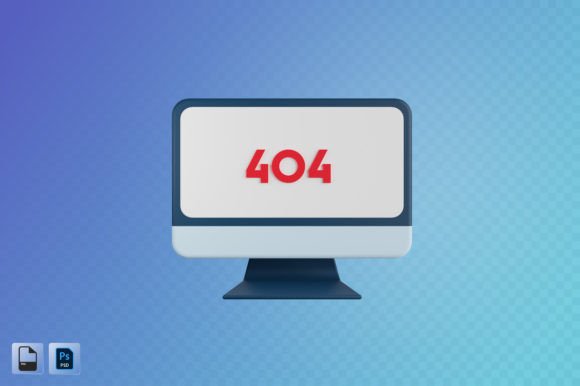
A 404 Error 3D Illustration is a high-quality digital artwork that depicts the 404 error in a three-dimensional style. These illustrations often feature characters, objects, or scenes that represent missing content in a lighthearted or imaginative way. The use of 3D elements adds depth and realism, making the design more engaging and visually appealing than traditional flat graphics.
Such illustrations are typically provided in formats like PSD and PNG, ensuring flexibility for various applications. With a resolution of up to 3000x3000 pixels, they maintain clarity and sharpness even when scaled for large displays or printed materials.
Real-World Applications Across Industries
Whether you’re a designer, developer, or marketer, a 404 Error 3D Illustration can serve multiple purposes. Here's how different professionals might find value in using these visuals:
- Web Designers: When designing websites, especially custom ones, a 404 illustration allows for branding consistency while guiding users back to the main site. For example, a tech startup might use a futuristic robot character to show the missing page, aligning with their overall aesthetic.
- App Developers: In mobile apps, a well-crafted 404 illustration can soften the blow of an error. It helps maintain user trust and keeps them on the app rather than leaving out of frustration. Think of an e-commerce app where a cartoon shopping cart falls off a cliff — a humorous yet clear representation of a lost page.
- UI/UX Professionals: User experience is all about reducing friction. A 3D illustration can make the error screen feel less abrupt. Adding subtle animations (if supported) or interactive elements enhances the user journey and reduces bounce rates.
- Content Creators: If you're creating infographics or educational content about website errors, a 404 illustration serves as a powerful visual metaphor. It’s easier to explain concepts like broken links or incorrect URLs with a relatable image than with just text.
- Marketing Teams: In social media advertising, using a quirky 404 illustration can spark conversation and shareability. A campaign that personifies the 404 error as a lost puppy or a broken bridge can resonate emotionally with the audience and encourage engagement.
- Presenters and Educators: During presentations or training sessions, a 404 illustration can be used to demonstrate technical issues in a digestible format. It helps learners visualize problems without getting bogged down in jargon.
- Print Designers: High-resolution 3D illustrations are excellent for posters or flyers related to digital topics. They offer a modern look that stands out in print and online simultaneously.
How Different Audiences Benefit from 404 Error 3D Illustrations
The beauty of a 404 Error 3D Illustration lies in its adaptability. Let’s explore how it caters to various audiences and needs:
For Brand Builders
Brands can use 404 illustrations to reinforce their identity. A minimalist fashion brand might opt for a sleek, abstract 404 scene with soft lighting and elegant shapes. Meanwhile, a playful gaming company could go for something vibrant and action-packed. Either way, the illustration becomes part of the brand narrative, helping to create a memorable user experience.
For Technical Support Teams
Support teams dealing with customer inquiries often need to explain complex issues in simple terms. A 404 illustration can be embedded in support documentation or email templates to help users understand the problem visually. It acts as a quick reference point and makes troubleshooting less intimidating.
For Educational Platforms
Platforms like coding schools or IT certifications can integrate 404 illustrations into tutorials or quizzes. Instead of showing a generic error message, they can illustrate the concept in context, such as a broken path in a network diagram or a lost file in a digital archive. This method supports better learning outcomes through visual storytelling.
For Creative Agencies
Creative agencies often need versatile assets that can be customized for client projects. A 404 Error 3D Illustration in PSD format allows for layer editing, meaning designers can tweak colors, add logos, or incorporate specific brand elements. This level of customization ensures the illustration fits seamlessly into any project scope.
Practical Considerations Before Choosing a 404 Error 3D Illustration
While 404 Error 3D Illustrations offer numerous benefits, there are a few things to consider before selecting one:
- Brand Tone and Style: Choose an illustration that matches your brand’s personality. A corporate website won’t benefit from a childlike, cartoonish 404 illustration in the same way a creative agency would.
- Technical Requirements: Ensure the file formats (PSD and PNG) align with your workflow. If you're working in After Effects or Blender, check if additional layers or source files are needed for animation.
- Resolution Needs: A 3000x3000 px illustration is ideal for most digital and print uses, but if you plan to scale it significantly larger or use it in ultra-high-definition screens, confirm that the quality remains intact.
- Accessibility: Even though the illustration is engaging, don't forget to pair it with clear, concise text. Some users may rely on screen readers or have cognitive disabilities, so readability should never be sacrificed for aesthetics.
- Relevance to Audience: Tailor the illustration to your users' expectations. A B2B software platform might prefer a more professional tone, while a kids’ educational app could use whimsical imagery to keep young users entertained.
Strengths and Limitations of 404 Error 3D Illustrations
Like any design asset, 3D illustrations come with their own set of advantages and potential drawbacks:
Strengths
- Visual Appeal: The 3D aspect captures attention and provides a polished look that elevates the user experience.
- Customization Options: With access to PSD files, designers can easily modify the illustration to suit specific project requirements.
- Versatility: These illustrations work across platforms — from web to mobile, print to video backgrounds — making them a valuable multi-use asset.
- Emotional Impact: A well-designed 404 illustration can turn a negative interaction into a positive one, encouraging users to stay engaged rather than leave.
Limitations
- Overcomplication Risk: While 3D illustrations are visually rich, they can sometimes distract from the core message. Balance is key to ensure users understand what went wrong and know how to fix it.
- File Size: High-resolution images and layered PSD files can take up significant storage space. Compressing them for web use is essential to maintain fast load times.
- Design Time: Customizing a 3D illustration may require more time compared to using a simple icon or text-based error notice, especially if the designer is unfamiliar with 3D tools.
Common Use Cases and Observations
Here are some real-world examples where 404 Error 3D Illustrations shine:
- Corporate Websites: Companies like banks or insurance providers use clean, professional 404 illustrations to maintain a serious brand image while subtly addressing the issue.
- E-commerce Platforms: Retail sites leverage humor or adventure themes in their 404 illustrations to keep customers from abandoning the site. A broken treasure map pointing to the homepage is both informative and entertaining.
- Portfolio Sites: Freelancers and creatives use 404 illustrations to showcase their design skills. A well-made illustration can reflect their artistic abilities and professionalism.
- Internal Dashboards: In enterprise software, a 404 illustration can help employees navigate internal systems by clearly indicating when a page isn't available, avoiding confusion with actual data loss.
- Mobile Apps: App developers often include a branded 404 illustration in their app's UI to reduce the chance of users uninstalling due to poor error handling.
In practice, the best 404 Error 3D Illustrations are those that guide users effectively. For instance, including a prominent “Go Back Home” button within the illustration layout ensures functionality isn’t lost beneath the art.
Why It Matters for Your Projects
When you're working on a design project — whether for a client or your own platform — every detail counts. A 404 Error 3D Illustration isn't just a decorative element; it's a strategic one. It shows thoughtfulness in user experience and reflects a commitment to quality in every corner of the site.
Imagine developing a new app and investing heavily in the home screen and features. What happens when someone lands on a broken link? A poorly designed 404 page can undo all that effort. But a well-crafted 3D illustration reassures users, maintains brand perception, and offers a seamless return to the intended experience.
Moreover, these illustrations can be reused across multiple touchpoints. The same 404 graphic might appear in a presentation slide, a social media ad, or a poster at a tech conference. That kind of versatility makes it a smart investment for any creative toolkit.
Final Thoughts on Practical Usage
Using a 404 Error 3D Illustration isn’t just about filling empty spaces. It's about turning setbacks into opportunities. Whether you're building a sleek web interface or preparing a marketing campaign, having a high-quality illustration ready can streamline your workflow and enhance your output.
Remember to evaluate the illustration against your specific needs. Does it speak to your audience? Does it fit your design language? And most importantly, does it help users navigate the problem effectively? By answering these questions, you'll ensure that your 404 Error 3D Illustration serves its purpose — not just as a graphic, but as a meaningful part of the user journey.