Hummingbird 3D Layered SVG Cut File: A Versatile Tool for Creative Art Projects
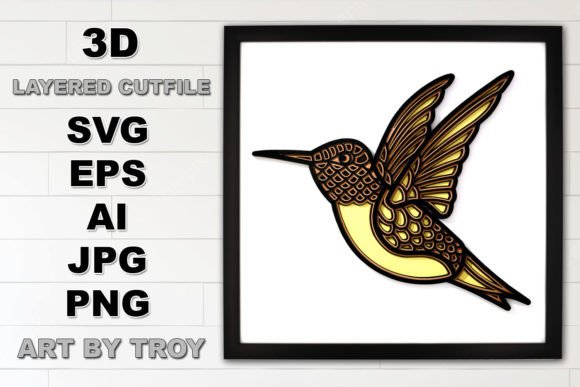
For crafters and artists who love to bring their designs to life with precision and depth, the Hummingbird 3D Layered SVG Cut File offers an exciting opportunity. This design is not just a simple cut file—it’s a layered masterpiece that allows you to create stunning 3D artwork with ease. Whether you're into card making, home décor, or custom gifts, this SVG file provides the structure and detail needed to elevate your projects from flat to fabulous.
What Is a 3D Layered SVG Cut File?
An SVG (Scalable Vector Graphics) cut file is a digital design used with cutting machines like Cricut or Silhouette to carve intricate shapes out of various materials. The Hummingbird 3D Layered SVG Cut File takes this concept further by incorporating multiple layers into one cohesive design. Specifically, it includes four distinct layers that stack together to form a three-dimensional hummingbird when assembled. This makes it ideal for creating dimensional accents without the need for complex modeling or sculpting skills.
Why Choose the Hummingbird 3D Layered SVG Cut File?
Many DIY enthusiasts face challenges when trying to add dimension to their crafts. Traditional methods often require tedious hand-cutting, layering, and gluing—processes that can be time-consuming and error-prone. The Hummingbird 3D Layered SVG Cut File simplifies this process significantly. It comes as a single, easy-to-use SVG file with all layers included, allowing you to focus on creativity rather than technicalities.
Additionally, the design's size of 11.5” x 10” fits neatly within a standard 12” x 12” crafting mat or laser cutter bed, which means you can work efficiently without worrying about resizing or repositioning. And because it’s scalable, you can easily adjust it to fit different project needs, whether you're crafting a small ornament or a large wall art piece.
Materials You Can Use with the Hummingbird Design
The beauty of the Hummingbird 3D Layered SVG Cut File lies in its versatility. You can use it with a wide range of materials including:
- Layered Cardstock: Perfect for paper crafts like greeting cards, scrapbook elements, and framed art.
- Vinyl: Great for adding color and texture to wooden signs or canvas pieces.
- Heat Transfer Vinyl (HTV): Ideal for personalizing clothing, bags, or other fabric items with a dimensional touch.
- Wood: With a Glowforge or compatible laser cutter, you can engrave or cut this design into wood for lasting, elegant décor.
Each material brings out unique characteristics of the hummingbird design. For example, using colored vinyl can make the wings stand out dramatically, while cutting into wood gives the piece a rustic, durable finish. Choosing the right material depends on your project goals and the tools you have available.
Compatible Cutting Machines and Software
This 3D multilayered hummingbird design is crafted to work seamlessly with popular cutting platforms such as:
- Cricut Design Space
- Silhouette Studio
- Glowforge laser cutter software
Whether you're using a silhouette-style machine for precise cuts or a Glowforge for detailed engravings, the Hummingbird 3D Layered SVG Cut File adapts well to each environment. Just upload the file to your preferred software, resize if needed, and let the machine do the rest. The layers are already separated and ready for cutting, saving you valuable time and effort.
Practical Applications and Project Ideas
There are countless ways to incorporate the Hummingbird 3D Layered SVG Cut File into your creative workflow. Here are some ideas to spark inspiration:
- Framed Wall Art: Create a layered hummingbird using cardstock or acrylic sheets and display it in a shadow box frame for a striking visual effect.
- Custom Greeting Cards: Add a pop-up hummingbird element to birthday or anniversary cards using layered cardstock for a magical surprise.
- Wooden Sign Accents: Laser cut the hummingbird into thin wood slices and glue them onto larger signs for a focal point that draws the eye.
- Ornaments and Decor: Use HTV or felt to make 3D hummingbird ornaments for holidays or year-round decoration.
- Fabric Appliqué: Apply the hummingbird to tote bags, aprons, or pillow covers using heat transfer vinyl for a stylish, personalized touch.
No matter what medium you choose, the hummingbird’s delicate wings and graceful curves provide a visually appealing subject that works across many styles and themes. Its universal charm makes it a great choice for both seasonal and everyday projects.
How to Approach the Design Based on Your Needs
Different users may approach the Hummingbird 3D Layered SVG Cut File in varied ways depending on their experience level and project goals. Beginners might appreciate using pre-colored vinyl or HTV for quick, no-glue applications, while advanced crafters could experiment with multiple colors and textures across each layer to achieve a more artistic look.
If you're working on a professional-level product, such as selling custom bird-themed décor, using high-quality materials like wood or metal can enhance durability and visual appeal. On the other hand, if you’re simply looking to create a heartfelt gift for a loved one, cardstock and paint might be the perfect combination for a warm, personal touch.
One key consideration is ensuring proper alignment when assembling the layers. Taking the time to measure and test-fit before gluing can save frustration later. Some users prefer using double-sided tape for temporary placement, while others opt for strong adhesive for permanent installations.
Tips for Successful Implementation
To get the most out of the Hummingbird 3D Layered SVG Cut File, consider these helpful tips:
- Test Before Committing: Try cutting the design on a smaller scale or less expensive material first to ensure accuracy and aesthetics.
- Use Layer Colors Strategically: Assign different colors to each layer to highlight details like feathers, wings, and body contours.
- Experiment with Lighting
- Combine with Other Elements: Pair the hummingbird with floral motifs or nature-inspired backgrounds to complete a scene.
- Scale Thoughtfully: While the design is flexible, keep in mind that overly large sizes may lose definition, while tiny versions may become fragile.
Another important tip is to clean and organize your layers after cutting. Removing excess material carefully ensures that the final assembly looks polished and professional. If you're using a laser cutter like Glowforge, take advantage of the engraving function to add subtle shading or background elements that complement the hummingbird.
Real-World Examples of the Design in Action
Many crafters have successfully used the Hummingbird 3D Layered SVG Cut File to create beautiful, eye-catching pieces. One popular application involves mounting the finished hummingbird on a painted birdbath for a garden accent. Another favorite is embedding the design into a clear resin block for a modern, minimalist sculpture.
Some users have even paired the hummingbird with LED lights inside a glass container, creating a soft-glowing centerpiece for parties or events. Others have printed each layer on patterned paper and assembled them for a vintage-style scrapbook page.
These examples show how adaptable the design is. By thinking creatively and tailoring the execution to your own style, you can turn a simple SVG file into something truly special.
Getting Started with Your Hummingbird Project
If you're new to using layered SVG files, the Hummingbird 3D Layered SVG Cut File is a great place to start. Begin by selecting your base material and determining the desired size. Then, upload the file to your cutting software and adjust it accordingly. Make sure to separate each layer before cutting, especially if your software requires manual grouping.
Once you’ve cut all the pieces, gently assemble them using a ruler and light pressure to align each part correctly. If you're using cardstock, you can reinforce the layers with a bit of glue or double-sided tape. For vinyl or HTV, follow the manufacturer’s instructions for application and heat pressing.
With patience and attention to detail, your hummingbird will transform from individual slices into a lifelike, dimensional creation. Don’t hesitate to customize the design further—add glitter, paint, or even small beads to give it a unique flair.
Final Thoughts
The Hummingbird 3D Layered SVG Cut File is more than just a template—it’s a foundation for creativity. Whether you're a seasoned crafter or just beginning your journey, this design empowers you to produce professional-looking artwork with minimal effort. Its compatibility with multiple materials and cutting tools ensures that there’s a version of this hummingbird that suits every artist’s needs.
By focusing on the outcome you want—be it a charming keepsake, a commercial product, or a decorative accent—you can tailor your approach and maximize the potential of this versatile SVG file. So why not dive in and explore how the Hummingbird 3D Layered SVG Cut File can inspire your next project? The possibilities are endless, and the results are sure to impress.